> ## Documentation Index
> Fetch the complete documentation index at: https://docs.innate.bot/llms.txt
> Use this file to discover all available pages before exploring further.
# Overview
The web app is a browser cockpit for MARS: drive the robot, collect training data, replay episodes, launch cloud training, and read the robot's logs — all from a browser tab, served by the robot itself with nothing to install.
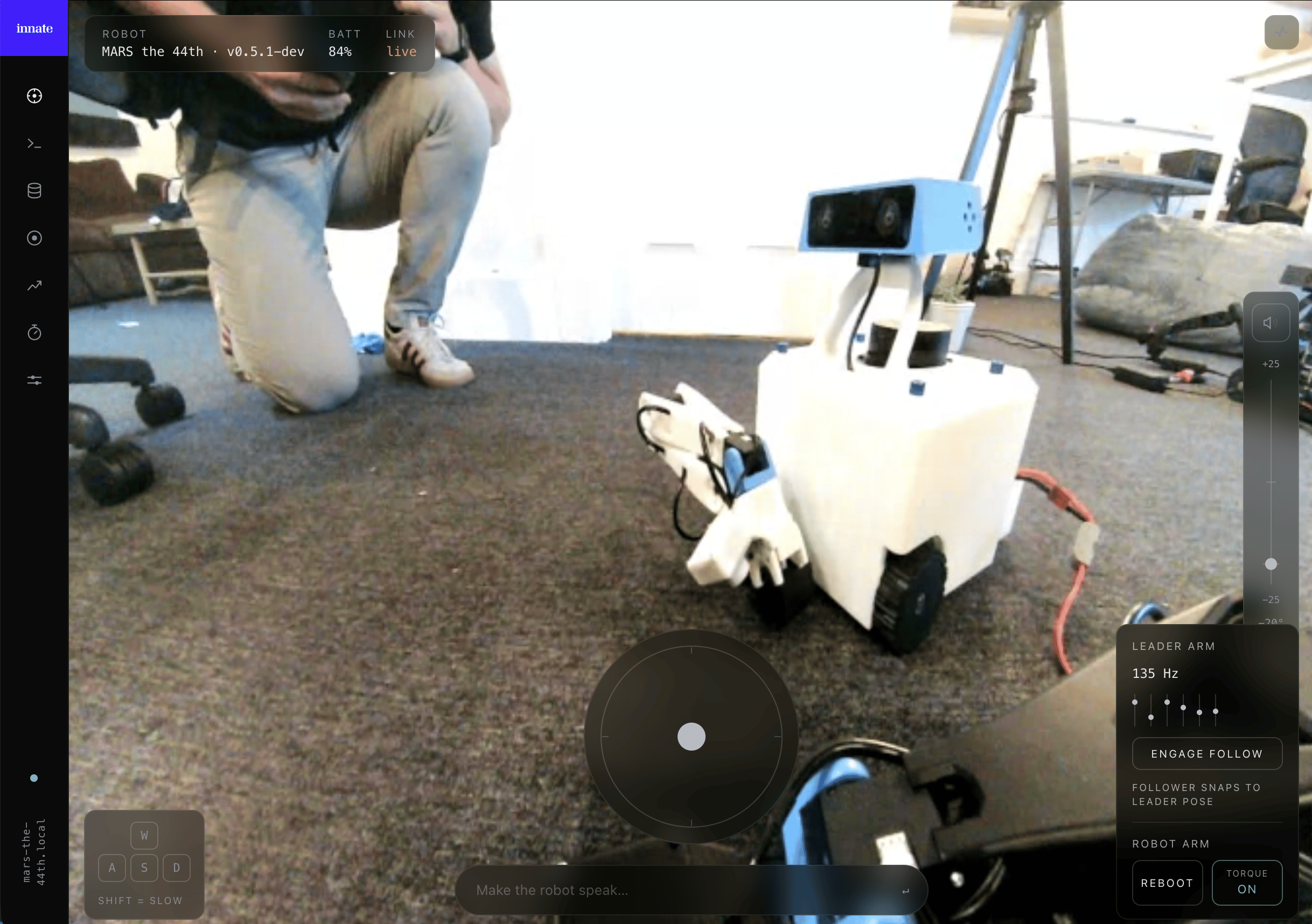 It's the browser counterpart to the [controller app](/robots/innate-controller-app) and talks to the same robot. The step-by-step workflows (teleoperation, recording a dataset, training, deploying) live in the topic guides and cover **both** surfaces — this page is just how to get in and what's where.
## Opening the web app
Point a browser at the robot over HTTPS, using its **IP address**:
```
https://
```
For example `https://192.168.1.42`. Find the robot's IP in **Configuration → WiFi** (or from your router). The `.local` hostname (e.g. `https://mars-robot.local`) works too, but mDNS name resolution is slower and less reliable on some networks, so prefer the IP. The certificate is self-signed, so your browser warns you the first time — accept it once per machine. A page opened from the robot connects back to it automatically.
Leader-arm teleoperation in the web app needs **Chrome or Edge**. It uses the browser's WebSerial API, which only those browsers support, and only on a secure origin — the robot's `https://` address is one. Driving, video, recording, training, and logs work in any modern browser.
## The pages
Switch between the web app's pages from the icon rail on the left:
* **Teleoperation** — live video, driving, the arm, head, and speech. → [Control & connectivity](/robots/mars/control-and-connectivity)
* **Collect** — record demonstration episodes into a training dataset. → [Record a dataset](/training/data-collection)
* **Datasets** — browse and replay recorded episodes (per-camera MP4 + synced joint graph). → [Review your dataset](/training/data-collection#review-your-dataset)
* **Training** — launch cloud training runs and watch progress, logs, and metrics. → [Train an ACT policy](/training/train-act-policy)
* **Profiling** *(in development, not in a released build yet)* — run scored policy rollouts with live inference charts. → [Rollout evaluation](/training/rollout-evaluation)
* **Logging** — a live, structured view of the robot's entire console. Web-app only:
Diagnose the robot's full log stream from a browser, without SSH.
## Web app vs. controller app
Use whichever fits: the phone app is best on the go and for leader-arm teleoperation in the field, while the web app shines on a laptop for data collection, training, and debugging on a larger screen.
The robot has a single camera stream, so the controller app and the web app can't both show video at once — they'll keep stealing the stream from each other. Close one before viewing video on the other. Driving, speech, and telemetry are unaffected.
## Current versions
The web app ships with Innate OS — its version tracks the robot's OS.
As of **June 2026**:
It's the browser counterpart to the [controller app](/robots/innate-controller-app) and talks to the same robot. The step-by-step workflows (teleoperation, recording a dataset, training, deploying) live in the topic guides and cover **both** surfaces — this page is just how to get in and what's where.
## Opening the web app
Point a browser at the robot over HTTPS, using its **IP address**:
```
https://
```
For example `https://192.168.1.42`. Find the robot's IP in **Configuration → WiFi** (or from your router). The `.local` hostname (e.g. `https://mars-robot.local`) works too, but mDNS name resolution is slower and less reliable on some networks, so prefer the IP. The certificate is self-signed, so your browser warns you the first time — accept it once per machine. A page opened from the robot connects back to it automatically.
Leader-arm teleoperation in the web app needs **Chrome or Edge**. It uses the browser's WebSerial API, which only those browsers support, and only on a secure origin — the robot's `https://` address is one. Driving, video, recording, training, and logs work in any modern browser.
## The pages
Switch between the web app's pages from the icon rail on the left:
* **Teleoperation** — live video, driving, the arm, head, and speech. → [Control & connectivity](/robots/mars/control-and-connectivity)
* **Collect** — record demonstration episodes into a training dataset. → [Record a dataset](/training/data-collection)
* **Datasets** — browse and replay recorded episodes (per-camera MP4 + synced joint graph). → [Review your dataset](/training/data-collection#review-your-dataset)
* **Training** — launch cloud training runs and watch progress, logs, and metrics. → [Train an ACT policy](/training/train-act-policy)
* **Profiling** *(in development, not in a released build yet)* — run scored policy rollouts with live inference charts. → [Rollout evaluation](/training/rollout-evaluation)
* **Logging** — a live, structured view of the robot's entire console. Web-app only:
Diagnose the robot's full log stream from a browser, without SSH.
## Web app vs. controller app
Use whichever fits: the phone app is best on the go and for leader-arm teleoperation in the field, while the web app shines on a laptop for data collection, training, and debugging on a larger screen.
The robot has a single camera stream, so the controller app and the web app can't both show video at once — they'll keep stealing the stream from each other. Close one before viewing video on the other. Driving, speech, and telemetry are unaffected.
## Current versions
The web app ships with Innate OS — its version tracks the robot's OS.
As of **June 2026**:
MARS OS0.6.0
Cloud Agent0.2.1
Controller App1.3.0