> ## Documentation Index
> Fetch the complete documentation index at: https://docs.innate.bot/llms.txt
> Use this file to discover all available pages before exploring further.
# Working with the Simulator
> Challenges, worlds, logs, ROS tooling, and what differs from a real robot
While the simulator is up, an entire robot is running on your machine: the
same Innate OS a physical MARS runs, inside a Docker container. It has no
copy of the software of its own. The `innate-os` folder you cloned during
[setup](/simulator/setup) is mounted into it live, so editing files on your
machine changes the running robot.
New here? Start with [Your first agent and skill](/software/your-first-agent).
## Objects
Open **Scene setup → Objects** in the 3D view to add a can, a ball, a cube, a crate, people, or a dog. Place each one **Near robot**, or choose a spot. Then ask the agent to use them, for example *"Pick up the blue can and put it in the box"*. It chains the shipped `pick_any_object` and `drop_in_box` skills.
## Worlds
The apartment is the default. Switch from **Scene setup → Environment** in the 3D view, or at launch:
```bash theme={"languages":{"custom":["/languages/python-typed.json"]}}
./innate-sim up --environment backrooms
```
| Environment | World |
| -------------- | ---------------------------------------------- |
| `apartment` | A furnished apartment with residents and a dog |
| `intersection` | A city crossroads with traffic |
| `backrooms` | Endless yellow corridors |
| `void` | An empty space |
## Challenges
Challenges are scored missions. Open the web app's **Agent** page and pick one: it resets the world, places the props it needs, and ticks off goals as you reach them. The simulator judges from the physics state, not from what the robot reports.
| Challenge | Mission |
| -------------------- | --------------------------------------------------------------------------------------- |
| **Nowhere** | MARS wakes up with nothing. Talk to it, give it what it asks for, and find the way out. |
| **Find a way out** | Guide MARS to the green exit in the Backrooms. |
| **Victory Lap** | Tell the robot good news and get it to celebrate with its `victory_spin` skill. |
| **Search & Rescue** | Someone collapsed in the apartment. Find them and stay by their side. |
| **Shepherd** | Find the soccer ball and push it to the dog. |
| **Tidy up** | Pick up a ball and drop it into a box. |
| **Household Orders** | Find three residents, take their food orders by talking to them, and submit all three. |
To write your own, add a file to `sim/challenges/`. The [simulator README](https://github.com/innate-inc/innate-os/blob/main/sim/README.md#challenges) shows the format.
## Watching it run
Three windows into the running stack, from shallow to deep:
* **`./innate-sim` (no arguments)** — the live dashboard: overall health, the
world server's render backend and speed, and the brain log.
* **`./innate-sim logs `** — tail one subsystem's log; `brain` shows
skill loading and agent reasoning, `startup` aggregates everything from
the last boot, `world-server` covers physics and rendering.
* **The tmux session** — every subsystem in its own window:
```bash theme={"languages":{"custom":["/languages/python-typed.json"]}}
./innate-sim sh
tmux attach -t innate # zenoh, rosbridge, sim-driver, nav-brain, behavior, arm-ik, vision-nav, console-webapp
```
### Foxglove and ROS tooling
Prefer [Foxglove](/software/foxglove-setup) or your own ROS tooling? The sim
launches a Foxglove bridge for you — nothing to start.
In [Foxglove](https://foxglove.dev), choose **Open connection → Foxglove
WebSocket**.
Enter `ws://localhost:8765` and connect. You get TF, `/scan`,
`/mars/main_camera/points`, the camera topics, and `/cmd_vel` teleop.
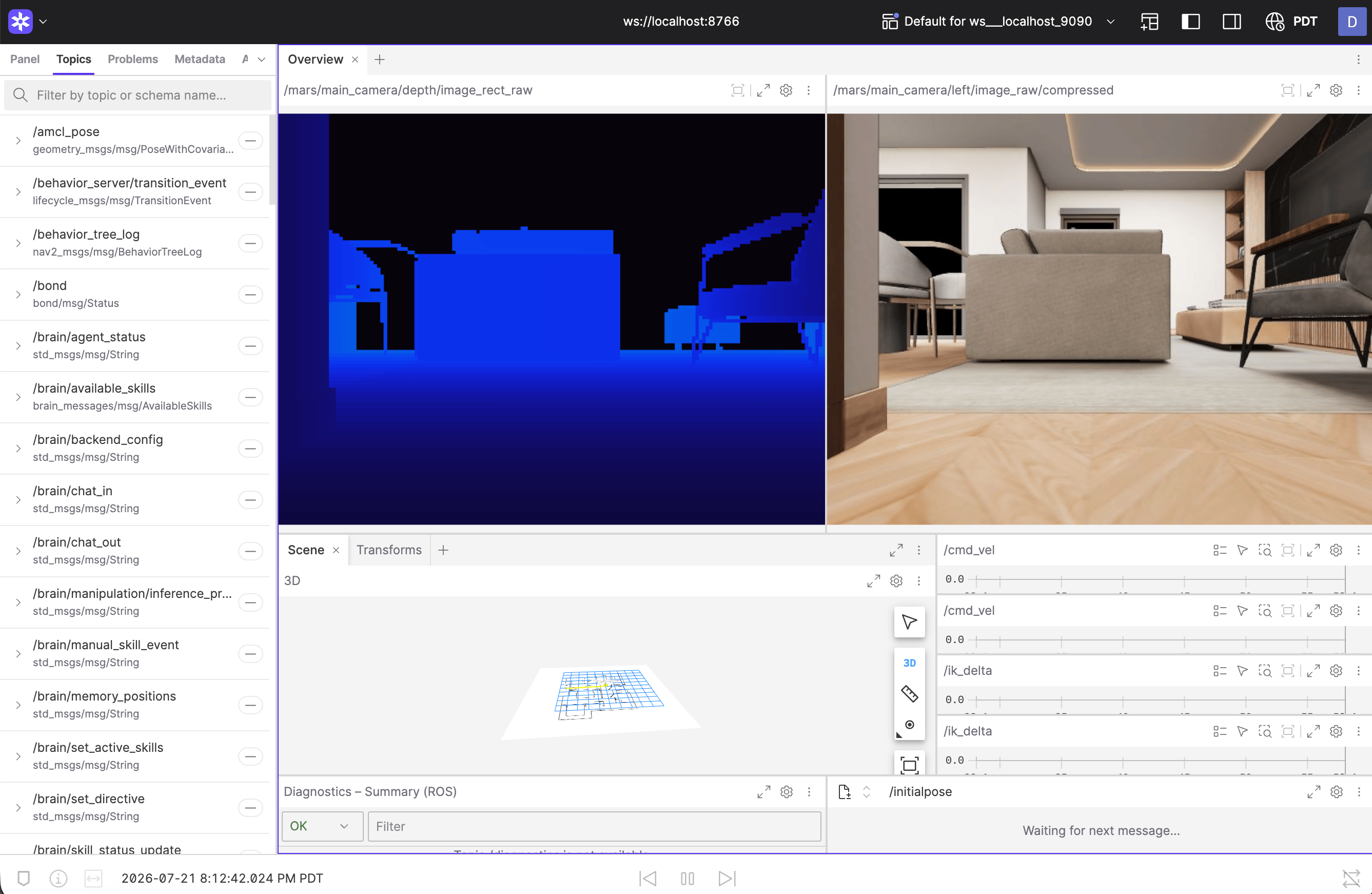 Running the **local brain**? Its cloud-agent owns port `8765`, so the
Foxglove bridge shifts to `ws://localhost:8766` — the dashboard and startup
log always print the exact address. For rosbridge clients,
`ws://localhost:9090` is open too.
The simulated driver publishes the exact topic surface of the real hardware
drivers — same topics, types, rates, and frame names — so anything you build
against it (input devices, dashboards, recorders) carries over to hardware
unchanged.
## What's different from a real robot
The point of the digital twin is that almost nothing is — but a few
hardware-bound features have no simulated counterpart:
* **Speech** requires the hosted backend: the web app's speak bar disables
itself with a hint when the sim runs on a local Gemini key or without a
backend.
* **Voice input** uses your computer's microphone: hold the microphone button
in the chat, or the spacebar, and talk. Like speech, it needs the hosted
backend (the Innate service key).
* **Policy-defined (trained) skills** need teleoperated episodes to train on,
and teleoperation isn't available in the simulator yet (coming soon). Until
then, use the simulator for [code skills](/software/skills/code-defined-skills)
and agents.
Everything else — navigation, lidar, cameras, depth, the arm — behaves and
publishes like the hardware it stands in for.
## The simulated world as a Python object
For scripts, notebooks, and RL loops there is a second way in that needs no
ROS and no Docker: `VirtualMars`, the whole simulated world as one Python
object.
```innatepy theme={"languages":{"custom":["/languages/python-typed.json"]}}
from mars_sim_driver.core import VirtualMars
sim = VirtualMars()
sim.step(1.0) # settle from spawn; step(dt) runs physics
sim.set_cmd_vel(0.3, 0.5) # vx m/s, wz rad/s
x, y, yaw = sim.pose() # ground truth
rgb = sim.render_rgb("main") # 640x480 camera image
scan = sim.lidar_scan(360, 12.0) # planar lidar
sim.reset() # back to spawn, zero velocity
```
The
[simulator README](https://github.com/innate-inc/innate-os/blob/main/sim/README.md)
has the walkthrough notebook, the full API, and the architecture of the
simulation stack.
Running the **local brain**? Its cloud-agent owns port `8765`, so the
Foxglove bridge shifts to `ws://localhost:8766` — the dashboard and startup
log always print the exact address. For rosbridge clients,
`ws://localhost:9090` is open too.
The simulated driver publishes the exact topic surface of the real hardware
drivers — same topics, types, rates, and frame names — so anything you build
against it (input devices, dashboards, recorders) carries over to hardware
unchanged.
## What's different from a real robot
The point of the digital twin is that almost nothing is — but a few
hardware-bound features have no simulated counterpart:
* **Speech** requires the hosted backend: the web app's speak bar disables
itself with a hint when the sim runs on a local Gemini key or without a
backend.
* **Voice input** uses your computer's microphone: hold the microphone button
in the chat, or the spacebar, and talk. Like speech, it needs the hosted
backend (the Innate service key).
* **Policy-defined (trained) skills** need teleoperated episodes to train on,
and teleoperation isn't available in the simulator yet (coming soon). Until
then, use the simulator for [code skills](/software/skills/code-defined-skills)
and agents.
Everything else — navigation, lidar, cameras, depth, the arm — behaves and
publishes like the hardware it stands in for.
## The simulated world as a Python object
For scripts, notebooks, and RL loops there is a second way in that needs no
ROS and no Docker: `VirtualMars`, the whole simulated world as one Python
object.
```innatepy theme={"languages":{"custom":["/languages/python-typed.json"]}}
from mars_sim_driver.core import VirtualMars
sim = VirtualMars()
sim.step(1.0) # settle from spawn; step(dt) runs physics
sim.set_cmd_vel(0.3, 0.5) # vx m/s, wz rad/s
x, y, yaw = sim.pose() # ground truth
rgb = sim.render_rgb("main") # 640x480 camera image
scan = sim.lidar_scan(360, 12.0) # planar lidar
sim.reset() # back to spawn, zero velocity
```
The
[simulator README](https://github.com/innate-inc/innate-os/blob/main/sim/README.md)
has the walkthrough notebook, the full API, and the architecture of the
simulation stack.