> ## Documentation Index
> Fetch the complete documentation index at: https://docs.innate.bot/llms.txt
> Use this file to discover all available pages before exploring further.
# How the Agent Decides
> What happens between your message and the robot's action
You don't need this page to build agents. Read it when you want to know why the robot did something.
The Innate agent is a loop that runs on the robot. Your [agent](/software/agents) gives it a prompt, skills, and inputs.
**Image to make: The agent loop.** Diagram of one turn: camera frame and new events (speech, skill feedback, inputs) go into the Innate agent, which sends them with the agent's prompt and skills to the model, then acts by running a skill, speaking, or waiting. Show the agent file feeding prompt, skills, and inputs into the loop. Replaces the old system diagram, which still says "B.A.S.I.C." and has "TKTK" labels.
## One turn at a time
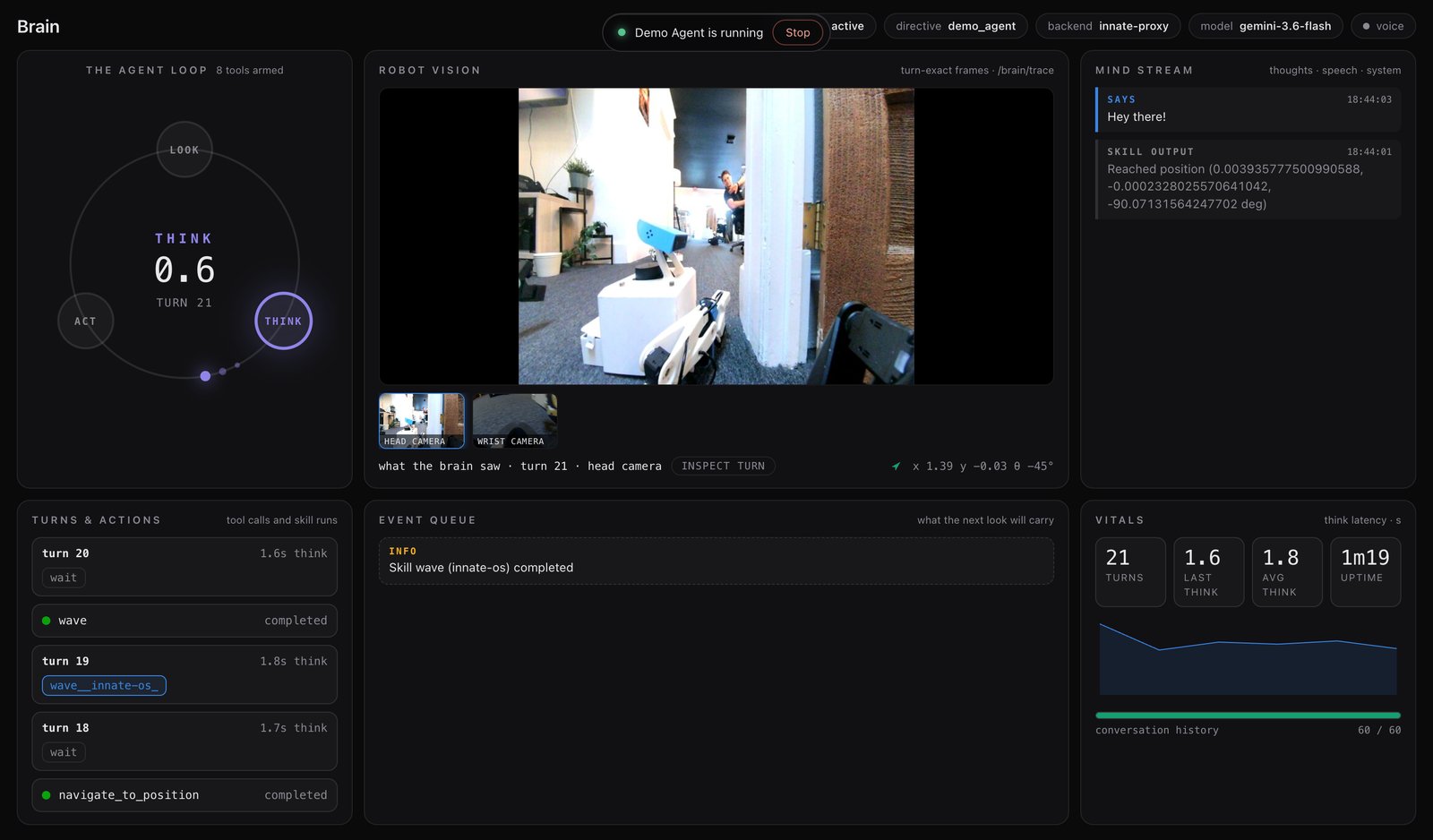
The agent works in turns, one at a time:
1. **Look.** Take the latest camera frame and everything new since the last turn: what you said, what a skill reported, what an input sent.
2. **Think.** Send that to the model with the agent's prompt, and its skills described as tools.
3. **Act.** Run a skill, say something, or wait.
Speech streams out sentence by sentence, so the robot starts talking before the turn is finished. If you speak before the robot does, the turn restarts with your words included.
Every skill in the agent becomes a tool. The `execute()` signature becomes the parameters and `guidelines()` becomes the description. A few tools are always there:
| Tool | What it does |
| --------------------- | --------------------------------------------------------------------------------------------- |
| `wait` | Do nothing until something changes. |
| `stop_current_skill` | Stop the running skill. While a skill runs, this is the only action offered. |
| `go_to_point_in_view` | Drive to a spot on the floor in the camera image. Only if the agent has `NavigateToPosition`. |
## Watch it think
The web app's **Brain** page shows every turn: the frames it saw, what it decided, and how long it took. Click **INSPECT TURN** to see the full request. It's the fastest way to learn why the robot did something.
 ## Which model runs it
The loop uses Gemini (`gemini-3.6-flash` by default, set in [`config/settings.yaml`](/software/configuration)). Choose how to reach it in `~/innate-os/.env`:
| Option | Setup |
| ----------------- | ---------------------------------------------------------------------------------------------------------------------------------------- |
| **Innate hosted** | Nothing. Robots ship with an `INNATE_SERVICE_KEY`. Free for 300 hours; ask on [Discord](https://discord.com/invite/KtkyT97kc7) for more. |
| **Your own key** | Set `GEMINI_API_KEY`. The robot calls Google directly. |
| **None** | Leave both unset. You can still drive and run skills by hand. |
## Which model runs it
The loop uses Gemini (`gemini-3.6-flash` by default, set in [`config/settings.yaml`](/software/configuration)). Choose how to reach it in `~/innate-os/.env`:
| Option | Setup |
| ----------------- | ---------------------------------------------------------------------------------------------------------------------------------------- |
| **Innate hosted** | Nothing. Robots ship with an `INNATE_SERVICE_KEY`. Free for 300 hours; ask on [Discord](https://discord.com/invite/KtkyT97kc7) for more. |
| **Your own key** | Set `GEMINI_API_KEY`. The robot calls Google directly. |
| **None** | Leave both unset. You can still drive and run skills by hand. |