> ## Documentation Index
> Fetch the complete documentation index at: https://docs.innate.bot/llms.txt
> Use this file to discover all available pages before exploring further.
# Configuration
> Tune how MARS behaves from one file — config/settings.yaml — without touching node code.
MARS keeps all of its tunable parameters in one place: **`config/settings.yaml`** in your `~/innate-os/` directory. Want to change how fast the robot drives, the camera resolution, or the TTS voice? You edit this one file — no digging through launch files or recompiling.
A companion **`.env`** file holds connectivity and secrets (your service key, cloud endpoint URLs). Keep those there; everything about how the robot *behaves* goes in `settings.yaml`.
## How it works
`config/settings.yaml` is a standard ROS 2 parameters file. On startup, MARS layers it **on top of** each node's built-in defaults — last value wins. So anything you set here overrides the default, and anything you leave alone keeps the default.
The file ships with **every knob commented out**, each next to its default value. An all-commented file means "no overrides," so behavior is unchanged until you uncomment something.
`config/settings.yaml` is created automatically from a template on update, and your edits are **never overwritten** by future updates.
## From the web app
The web app's **Settings** page edits `config/settings.yaml` as a form — the easiest way to change a value, with no SSH or YAML.
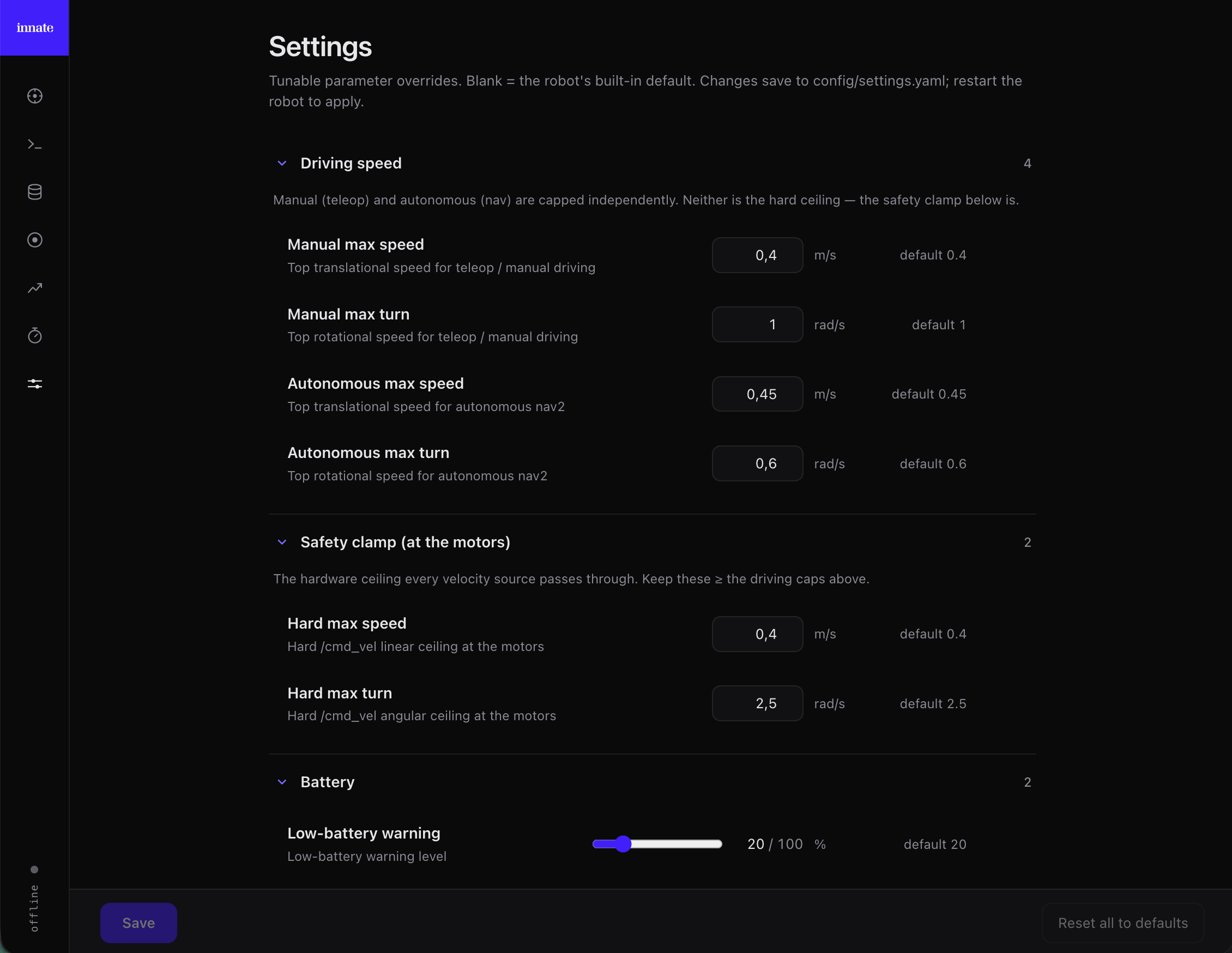 Open the web app at `https://` and click the **Settings** icon (sliders) in the left rail.
Each tunable shows its **default** and its **current** value. Edit a field (or flip a toggle) to override it, or **reset** a row to return it to the default. Rows are color-coded — **orange** = a saved override, **blue** = an unsaved edit — and a counter shows how many unsaved changes you have.
Click **Save** (enabled only when something changed) to write your overrides to `config/settings.yaml`. **Reset all to defaults** clears every override at once.
Parameters are read when nodes start, so restart the stack:
```bash theme={null}
innate service restart
```
The Settings page shows a curated set of the most common knobs (driving speed, safety clamp, battery, arm). For anything else, edit the file directly — see below; the file documents every parameter with an inline comment.
## Editing the file directly
Prefer SSH, or need a knob the Settings page doesn't show? Edit `config/settings.yaml` yourself — it's the same file the web app writes, so the two stay in sync.
```bash theme={null}
nano ~/innate-os/config/settings.yaml
```
Uncomment the `node:` line, the `ros__parameters:` line, **and** the value(s) you want — all together — then set your value. For example, to lower the top driving speed:
```yaml theme={null}
/**:
ros__parameters:
motion_control:
max_speed: 0.3 # m/s, was 0.4
max_angular_speed: 1.0 # rad/s
```
Use decimals for float values (`0.3`, not `3`) so ROS keeps them as floats.
Parameters are read when nodes start, so restart the stack:
```bash theme={null}
innate service restart
```
`/**` applies the value to **every** node that uses that parameter (e.g. one `motion_control.max_speed` reaches the joystick, the keyboard, and the app at once). A named section like `mars_arm:` targets a single node.
## What you can tune
A few of the most common knobs (see the file itself for the full list and per-key comments):
| Section | What it controls |
| ------------------------------------------ | ---------------------------------------------- |
| `motion_control` | Manual driving speed (joystick, keyboard, app) |
| `nav` | Autonomous (nav2) driving speed |
| `bringup` → `battery` | Low-battery warning / critical levels |
| `bringup` → `safety` | Hard `/cmd_vel` speed clamp at the motors |
| `mars_arm` | Arm jerk limit, motor-protection cooldown |
| `main_camera_driver` | Resolution, FPS, JPEG quality, exposure |
| `manipulation_server` | Learned-skill inference rate and speed |
| `brain_client_node` / `input_manager_node` | Camera FOV, TTS voice, speech models |
`bringup` → `safety` is the hardware speed ceiling every command passes through — it's a backstop, not driving feel. Keep it **greater than or equal to** your `motion_control` and `nav` speeds.
## Reference
Go deeper — modify and rebuild ROS2 nodes.
Every command, including `service restart`.
Open the web app at `https://` and click the **Settings** icon (sliders) in the left rail.
Each tunable shows its **default** and its **current** value. Edit a field (or flip a toggle) to override it, or **reset** a row to return it to the default. Rows are color-coded — **orange** = a saved override, **blue** = an unsaved edit — and a counter shows how many unsaved changes you have.
Click **Save** (enabled only when something changed) to write your overrides to `config/settings.yaml`. **Reset all to defaults** clears every override at once.
Parameters are read when nodes start, so restart the stack:
```bash theme={null}
innate service restart
```
The Settings page shows a curated set of the most common knobs (driving speed, safety clamp, battery, arm). For anything else, edit the file directly — see below; the file documents every parameter with an inline comment.
## Editing the file directly
Prefer SSH, or need a knob the Settings page doesn't show? Edit `config/settings.yaml` yourself — it's the same file the web app writes, so the two stay in sync.
```bash theme={null}
nano ~/innate-os/config/settings.yaml
```
Uncomment the `node:` line, the `ros__parameters:` line, **and** the value(s) you want — all together — then set your value. For example, to lower the top driving speed:
```yaml theme={null}
/**:
ros__parameters:
motion_control:
max_speed: 0.3 # m/s, was 0.4
max_angular_speed: 1.0 # rad/s
```
Use decimals for float values (`0.3`, not `3`) so ROS keeps them as floats.
Parameters are read when nodes start, so restart the stack:
```bash theme={null}
innate service restart
```
`/**` applies the value to **every** node that uses that parameter (e.g. one `motion_control.max_speed` reaches the joystick, the keyboard, and the app at once). A named section like `mars_arm:` targets a single node.
## What you can tune
A few of the most common knobs (see the file itself for the full list and per-key comments):
| Section | What it controls |
| ------------------------------------------ | ---------------------------------------------- |
| `motion_control` | Manual driving speed (joystick, keyboard, app) |
| `nav` | Autonomous (nav2) driving speed |
| `bringup` → `battery` | Low-battery warning / critical levels |
| `bringup` → `safety` | Hard `/cmd_vel` speed clamp at the motors |
| `mars_arm` | Arm jerk limit, motor-protection cooldown |
| `main_camera_driver` | Resolution, FPS, JPEG quality, exposure |
| `manipulation_server` | Learned-skill inference rate and speed |
| `brain_client_node` / `input_manager_node` | Camera FOV, TTS voice, speech models |
`bringup` → `safety` is the hardware speed ceiling every command passes through — it's a backstop, not driving feel. Keep it **greater than or equal to** your `motion_control` and `nav` speeds.
## Reference
Go deeper — modify and rebuild ROS2 nodes.
Every command, including `service restart`.