

innate-os folder you cloned during
setup is mounted into it live, so editing files on your
machine changes the running robot.
New here? Start with Your first agent and skill.
Objects
Open Scene setup → Objects in the 3D view to add a can, a ball, a cube, a crate, people, or a dog. Place each one Near robot, or choose a spot. Then ask the agent to use them, for example “Pick up the blue can and put it in the box”. It chains the shippedpick_any_object and drop_in_box skills.
Worlds
The apartment is the default. Switch from Scene setup → Environment in the 3D view, or at launch:Challenges
Challenges are scored missions. Open the web app’s Agent page and pick one: it resets the world, places the props it needs, and ticks off goals as you reach them. The simulator judges from the physics state, not from what the robot reports.
To write your own, add a file to
sim/challenges/. The simulator README shows the format.
Watching it run
Three windows into the running stack, from shallow to deep:-
./innate-sim(no arguments) — the live dashboard: overall health, the world server’s render backend and speed, and the brain log. -
./innate-sim logs <target>— tail one subsystem’s log;brainshows skill loading and agent reasoning,startupaggregates everything from the last boot,world-servercovers physics and rendering. -
The tmux session — every subsystem in its own window:
Foxglove and ROS tooling
Prefer Foxglove or your own ROS tooling? The sim launches a Foxglove bridge for you — nothing to start.1
Open a connection in Foxglove
In Foxglove, choose Open connection → Foxglove
WebSocket.
2
Connect to the bridge
Enter
ws://localhost:8765 and connect. You get TF, /scan,
/mars/main_camera/points, the camera topics, and /cmd_vel teleop.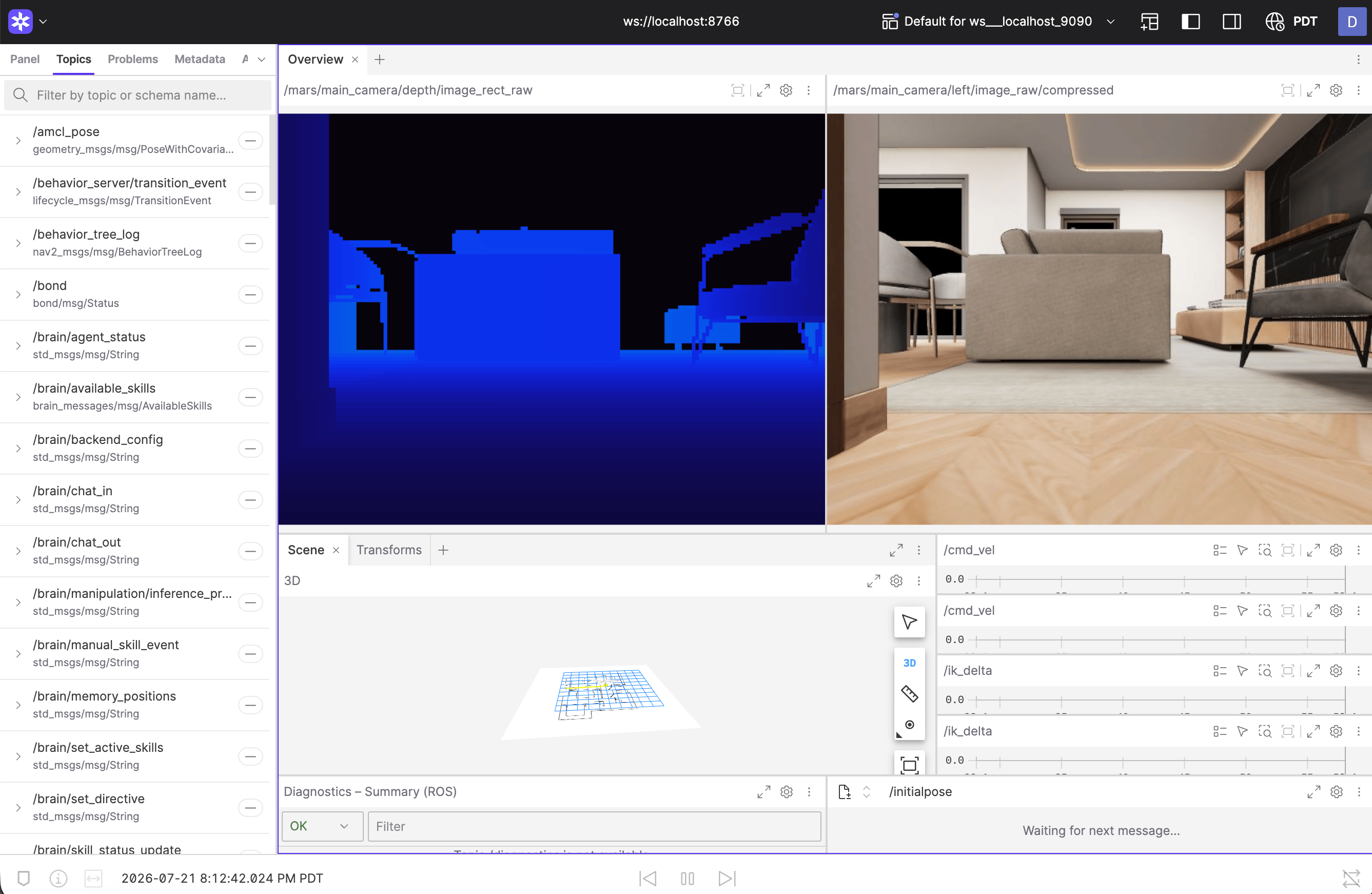
Running the local brain? Its cloud-agent owns port
8765, so the
Foxglove bridge shifts to ws://localhost:8766 — the dashboard and startup
log always print the exact address. For rosbridge clients,
ws://localhost:9090 is open too.What’s different from a real robot
The point of the digital twin is that almost nothing is — but a few hardware-bound features have no simulated counterpart:- Speech requires the hosted backend: the web app’s speak bar disables itself with a hint when the sim runs on a local Gemini key or without a backend.
- Voice input uses your computer’s microphone: hold the microphone button in the chat, or the spacebar, and talk. Like speech, it needs the hosted backend (the Innate service key).
- Policy-defined (trained) skills need teleoperated episodes to train on, and teleoperation isn’t available in the simulator yet (coming soon). Until then, use the simulator for code skills and agents.
The simulated world as a Python object
For scripts, notebooks, and RL loops there is a second way in that needs no ROS and no Docker:VirtualMars, the whole simulated world as one Python
object.