config/settings.yaml in your ~/innate-os/ directory. Want to change how fast the robot drives, the camera resolution, or the TTS voice? You edit this one file — no digging through launch files or recompiling.
A companion .env file holds connectivity and secrets (your service key, cloud endpoint URLs). Keep those there; everything about how the robot behaves goes in settings.yaml.
How it works
config/settings.yaml is a standard ROS 2 parameters file. On startup, MARS layers it on top of each node’s built-in defaults — last value wins. So anything you set here overrides the default, and anything you leave alone keeps the default.
The file ships with every knob commented out, each next to its default value. An all-commented file means “no overrides,” so behavior is unchanged until you uncomment something.
config/settings.yaml is created automatically from a template on update, and your edits are never overwritten by future updates.From the web app
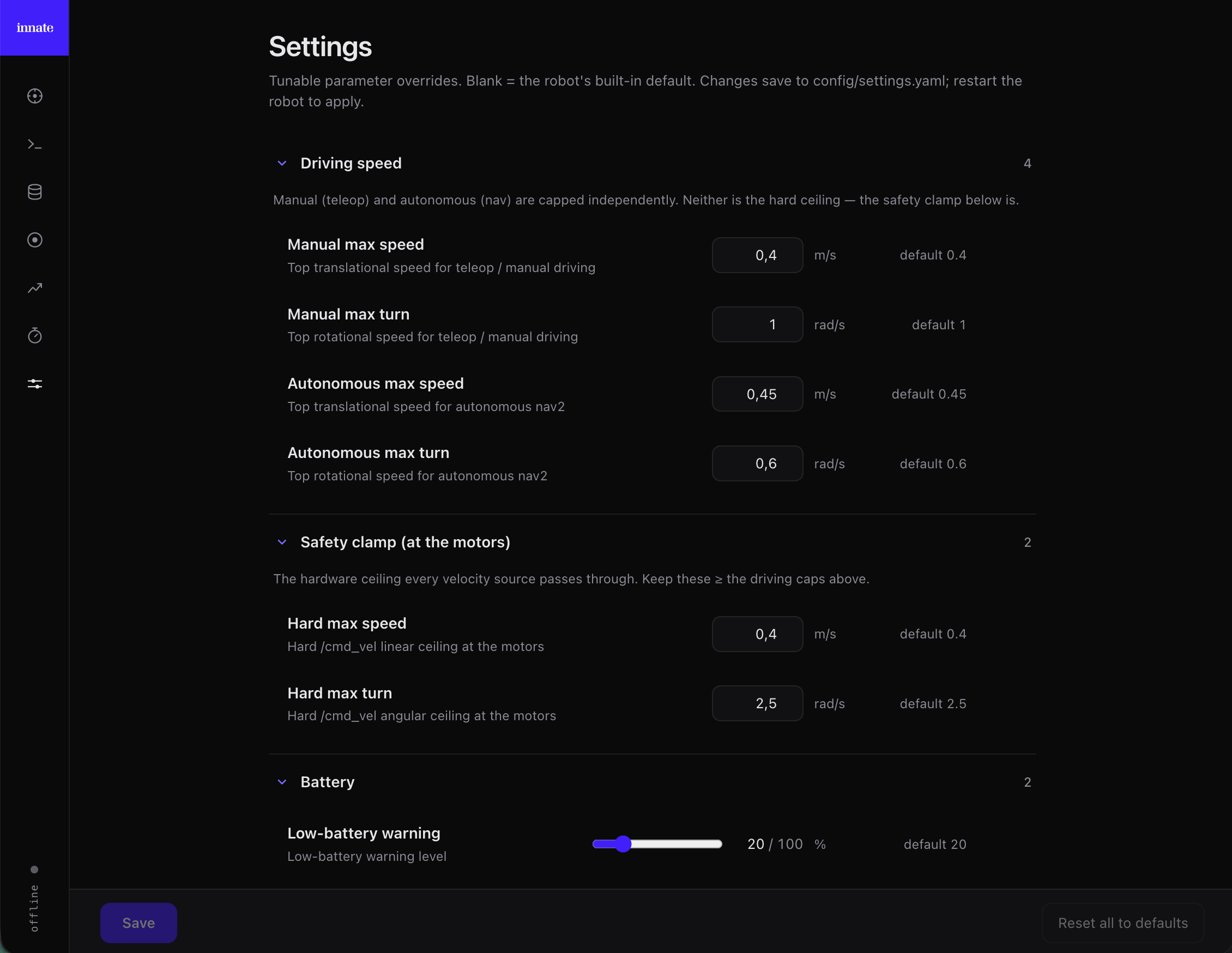
The web app’s Settings page editsconfig/settings.yaml as a form — the easiest way to change a value, with no SSH or YAML.

Open Settings
Open the web app at
https://<robot-ip> and click the Settings icon (sliders) in the left rail.Change a value
Each tunable shows its default and its current value. Edit a field (or flip a toggle) to override it, or reset a row to return it to the default. Rows are color-coded — orange = a saved override, blue = an unsaved edit — and a counter shows how many unsaved changes you have.
Save
Click Save (enabled only when something changed) to write your overrides to
config/settings.yaml. Reset all to defaults clears every override at once.The Settings page shows a curated set of the most common knobs (driving speed, safety clamp, battery, arm). For anything else, edit the file directly — see below; the file documents every parameter with an inline comment.
Editing the file directly
Prefer SSH, or need a knob the Settings page doesn’t show? Editconfig/settings.yaml yourself — it’s the same file the web app writes, so the two stay in sync.
Uncomment a whole stanza
Uncomment the Use decimals for float values (
node: line, the ros__parameters: line, and the value(s) you want — all together — then set your value. For example, to lower the top driving speed:0.3, not 3) so ROS keeps them as floats.What you can tune
A few of the most common knobs (see the file itself for the full list and per-key comments):| Section | What it controls |
|---|---|
motion_control | Manual driving speed (joystick, keyboard, app) |
nav | Autonomous (nav2) driving speed |
bringup → battery | Low-battery warning / critical levels |
bringup → safety | Hard /cmd_vel speed clamp at the motors |
mars_arm | Arm jerk limit, motor-protection cooldown |
main_camera_driver | Resolution, FPS, JPEG quality, exposure |
manipulation_server | Learned-skill inference rate and speed |
brain_client_node / input_manager_node | Camera FOV, TTS voice, speech models |
Reference
Advanced Development
Go deeper — modify and rebuild ROS2 nodes.
Innate CLI
Every command, including
service restart.